Simplify Team Communication with LOV111VOL
This unified email client and task manager is built for modern teams. Manage emails, plan deadlines, and assign tasks in one smart productivity platform.
Move emails into structured folders, automate sorting, and update message statuses to track task progress — all using an intuitive drag-and-drop interface.
Key Features:
- Expandable and customizable folder structures
- Create calendar entries directly from emails
- Track task progress and message status
- Automated email organization and routing rules
This solution improves productivity, supports teamwork, and keeps all communication transparent, structured, and secure in a single system.
Frequently Asked Questions about Email Client Software
What is Email Management Software?
Email management software helps teams organize, track, and manage email communication efficiently and securely, replacing traditional email clients with workflow-focused tools.
How fast can I start using the software?
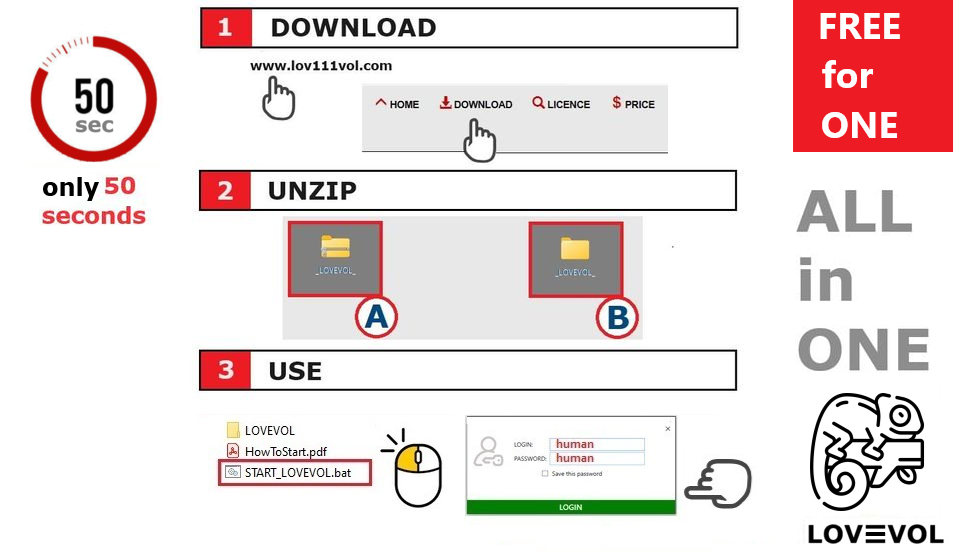
You can start in under one minute. Simply download, unzip, and launch — no installation or internet connection required.
Does it work without an internet connection?
Yes, the software operates fully offline over local networks such as LAN or Wi-Fi, making it ideal for secure internal office communication.
Is it a secure way to manage email?
Yes, all communications are encrypted using AES encryption combined with public-private key cryptography. Messages can be configured to auto-delete for enhanced privacy.
Can I customize the interface with my own branding?
Yes, the system supports branding customization, including custom logos and color schemes to match your organization’s identity.
Can it work online as well?
While primarily designed for offline local networks, the platform can also operate online when hosted on a server, depending on your infrastructure.