Team Calendar Software is designed to streamline time and task management within teams, helping organizations coordinate meetings and projects efficiently.
Main Features:
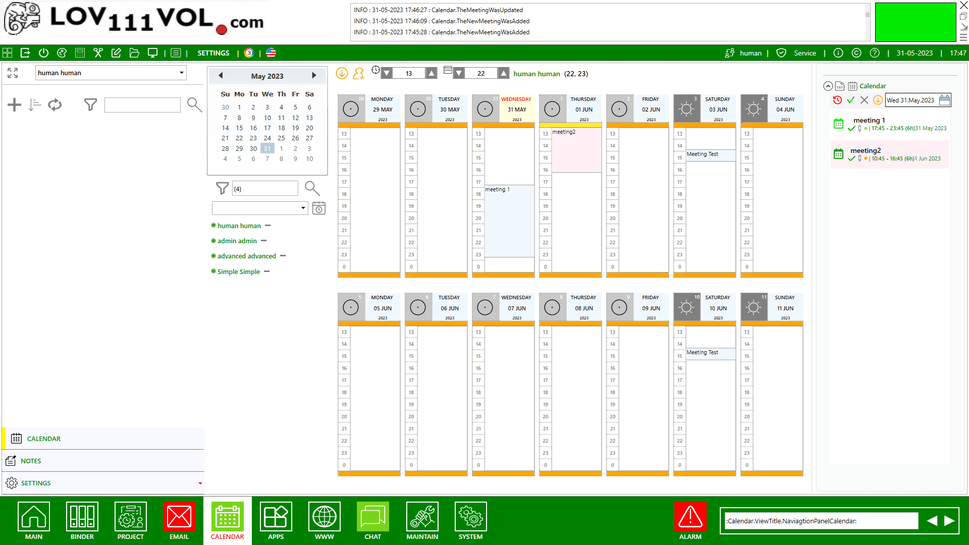
- Create and assign events and tasks easily
- Track task progress and deadlines
- Organize team schedules and meetings
- Book rooms for events and meetings
- Automate routine scheduling workflows
Our calendar tool for teams supports efficient time management, project tracking, and resource coordination without unnecessary complexity.
Electronic Team Calendar provides a centralized system for team planning and scheduling, helping teams coordinate tasks and projects in one place.
Frequently Asked Questions - Team Calendar Software
Q: What is team calendar software?
A: Team calendar software is a digital tool that replaces paper calendars, allowing teams to schedule events, manage tasks, and coordinate deadlines efficiently.
Q: How can it improve team collaboration?
A: It enables teams to share schedules, assign tasks, and manage time collectively, improving communication and project coordination.
Q: Is the team calendar software easy to install and use?
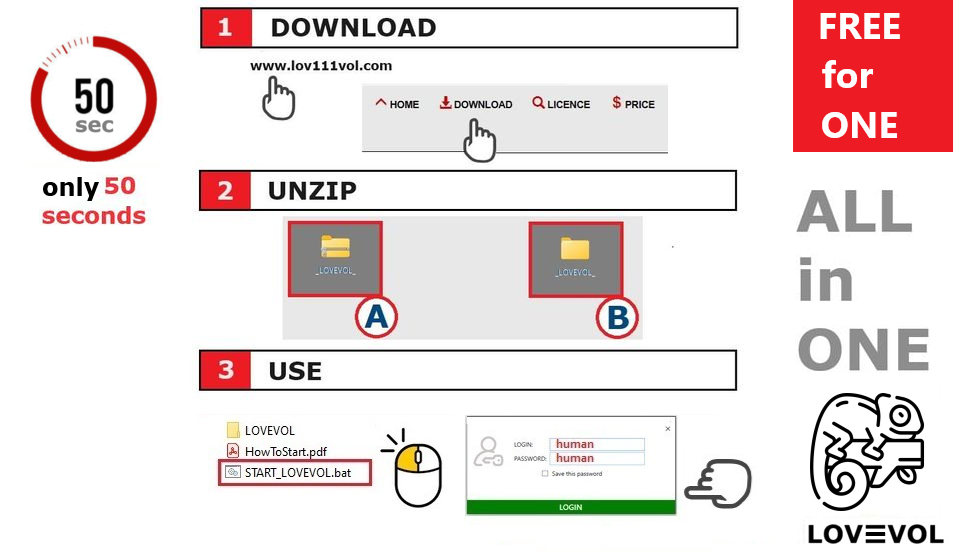
A: Yes. The software features a step-by-step installation process and a user-friendly interface suitable for all team members.
Q: Do I need internet access to use the calendar?
A: No. The calendar software works offline on local devices or via a LAN network, ensuring schedules are always accessible.
Q: Can I manage both events and tasks?
A: Yes. You can create, assign, and track events, deadlines, and tasks in a single interface.
Q: Is it compatible with Windows and macOS?
A: Yes. Native support is included for Windows, and it can run on macOS or Linux using Wine or Mono.
Q: Can teams share calendars and schedule meetings?
A: Yes. Team members can share schedules, assign tasks, book rooms, and control access permissions.
Q: Is my data secure?
A: Yes. All calendar and task data is stored locally and can be encrypted, ensuring schedules remain private and protected.
Q: Can I integrate this calendar with projects or workflows?
A: Yes. The software supports integration with task management and project tracking systems for seamless planning.
Q: How quickly can a team start using it?
A: For small teams, setup usually takes 5–6 minutes. See installation instructions for teams.
Q: Do I need technical knowledge to run it?
A: No. This digital workspace is made to be easy to use for small teams and companies without an IT department. You can set it up yourself in about 1 minute, without any technical knowledge.