ITIL Service Desk Software | IT Support & Ticketing

ITIL Service Management Software (ITSM)

Looking for an ITSM tool? Combines helpdesk, ticketing, and ITIL features in one smart platform.

Runs in just 50 seconds — with automation that saves your team time.

Streamline IT support, resolve tickets faster, and stay in control with a modern IT Service Management system.

Save up to 80% of your time — with automation and structured ITSM workflows.

IT Service Desk – Help Desk Ticketing System

HOW TO INSTALL

Step-by-step guide to install the help desk
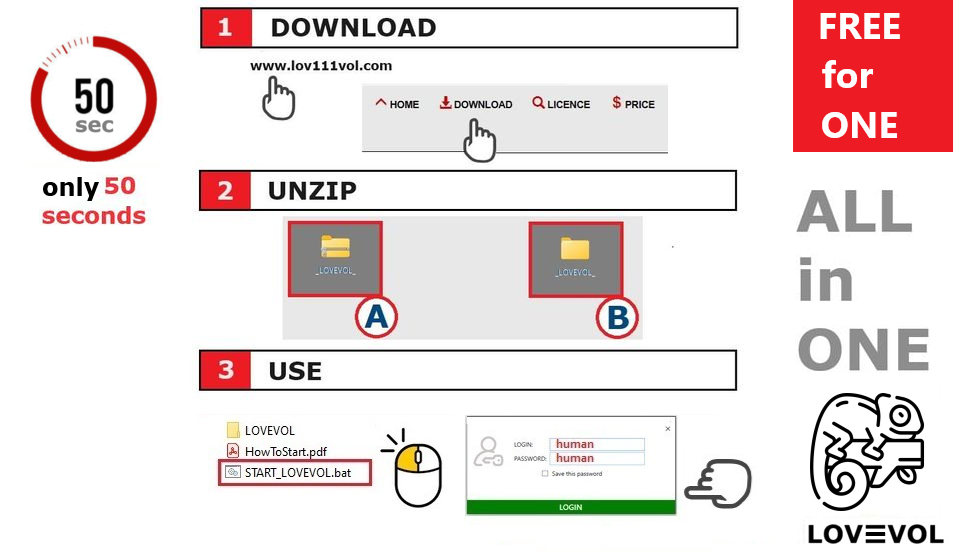
How to Download and Run

Follow these simple steps to start using the app:

  1. Download from lov111vol.com .
  2. Extract the downloaded ZIP file using “Extract All”.
  3. Run START_LOV111VOL.bat from the extracted folder.
  4. Login with Username: human and Password: human.

Benefits of ITIL Service Desk Software

Key benefits of IT Help Desk software for efficient support

Optimize IT Support

This IT service desk solution delivers fast and efficient help desk operations based on ITIL principles. Automate tasks, resolve issues quickly, and manage support tickets using AI-powered tools.

Assign roles, track issues, and improve customer experience — all within a unified IT support platform designed for modern teams.

  • Automated ticket workflows
  • Fast response times with AI assistance
  • Compliance with key ITIL practices
  • Optimized ticket lifecycle management

This platform replaces slow, outdated systems with a high-speed IT help desk solution that increases team productivity and support quality.

AI features can automatically suggest previously resolved tickets when a new ticket is created, speeding up problem resolution and reducing duplicate work.

Key Features of ITIL Service Management Software

Key features of IT Support and Help Desk Software

A Scalable IT Service Desk Solution

Manage IT support operations from one platform with this IT service desk software. It supports team collaboration, automated task distribution, and access control.

  • Real-time role and access assignment
  • Resource sharing and ticket updates
  • Built-in automation and AI-driven logic
  • Tailored for both individual users and support teams

Deliver faster, more reliable IT assistance with a centralized help desk system. Designed for efficiency and simplicity in business environments.

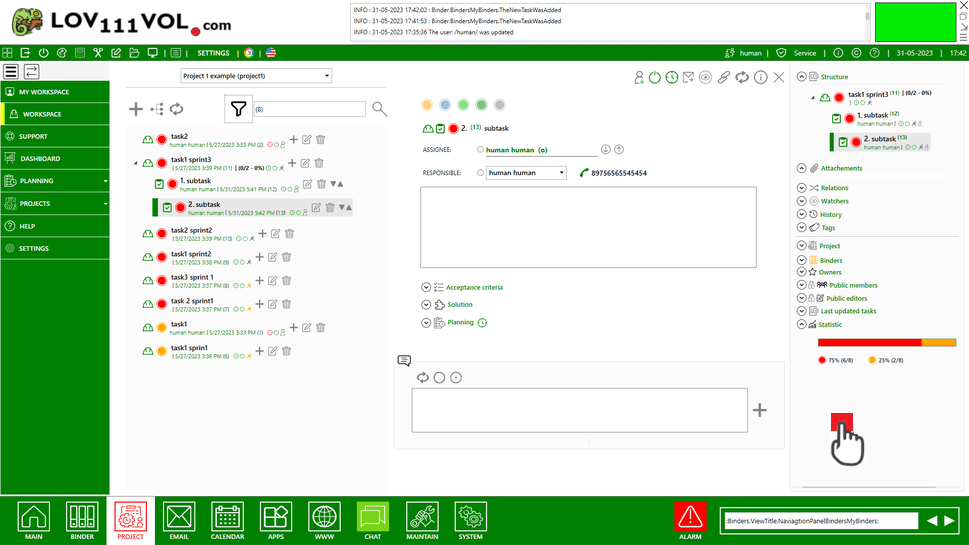
Example of ITIL-Compliant Help Desk Automation

ITIL Compliant ITSM Tool for Service Management

Stay ITIL-Compliant with Smart ITSM Software

This IT Service Management Tool helps companies align with ITIL standards, optimizing incident, change, and service request management. It supports ticket lifecycle transparency and enforces structured role access policies.

  • Full alignment with ITIL/ITSM practices
  • AI-accelerated ticket management
  • Workflow customization and automation
  • Visibility into ticket stages and history

The ITSM suite brings clarity, speed, and control to your IT support processes, helping organizations improve service quality and maintain compliance effortlessly.

Frequently Asked Questions (FAQ)

What is a Smart IT Service Management Tool?

A Smart IT Service Management Tool replaces traditional service desks, offering fast offline access, secure ticket handling, and smooth collaboration within internal networks. It is ITIL-compliant, supporting standard service workflows.

How does it replace classic IT support systems?

The tool digitizes your support and service processes, enabling internal users to log issues, request features, and manage tasks—all without needing internet access. Its ITIL-compliant design helps align with industry-standard service operations.

Can my team use it collaboratively?

Yes, the software supports team collaboration across local networks with shared ticket boards, real-time updates, and user-specific roles for secure access.

Is it usable offline?

Absolutely. This ITSM tool is built for offline-first environments, ensuring full control, privacy, and uninterrupted IT service management without internet dependency.

Is it ITIL-compliant?

Yes, it follows ITIL best practices, supporting structured workflows for incident, request, and change management. It's ideal for teams that require alignment with ITIL standards in offline or LAN-based environments.

Does it use Artificial Intelligence (AI)? 🟡

Yes. The tool uses AI to assist users by automatically suggesting similar resolved tickets as soon as a new issue is entered. This helps speed up resolution time and reduces duplicated work.

How fast can I start using it?

Installation takes under 1 minute: download, unzip, and launch. No setup, registration, or configuration is required.

Launch ITIL Software for Teams