LAN Messenger: Secure Offline Messaging for Teams

LAN Messenger: Secure Offline Messaging for Teams

LAN Messenger for your office — LOV111VOL

This tool lets teams communicate quickly over a local network. After downloading, it’s ready to use in moments and works without internet.

Compatible with All Windows Devices

It runs on Windows PCs and laptops without needing a server or cloud service. You can chat securely using your local area network (LAN).

Free for Teams – 1-Year License Included

Reinstall after one year to extend usage free.
Save up to 80% of communication time with this reliable offline messaging app.

Intro to offline LAN Messenger for team communication

How to Download and Run LAN Messenger

Step-by-step guide on how to download and run LAN Messenger
Getting Started with LOV111VOL LAN Messenger
Follow these steps to download and launch the app:
  1. Download from lov111vol.com.
  2. Extract the downloaded ZIP file using "Extract All".
  3. Run START_LOV111VOL.bat from the extracted folder.
  4. Login with Username: human and Password: human.

Key Features of Secure Offline Messaging

Advantages of offline LAN Messenger for secure team communication without internet

Team Communication with LAN Messenger

The LAN Messenger provides encrypted, reliable messaging for individuals and groups on your local network. Share files securely and communicate offline without requiring an internet connection.

Organize communication with role assignments and basic workflows to maintain coordination across teams.

Key Advantages

  • Reduces communication delays
  • Fully operational within 50 seconds after download
  • Supports file sharing, private messages, and group chats
  • Basic automation for structured messaging
  • Secure, encrypted communication over LAN without internet
  • Optional message auto-deletion for privacy
  • Simple setup via shared folder database configuration
  • Supports local or cloud database options

This offline messaging tool provides reliable and secure communication for teams in any environment.

Privacy Reminder: Messages are automatically erased after one week, ensuring your discussions remain confidential and your workspace uncluttered.

Benefits of the LAN Messenger for Your Team

Key features of LAN Messenger for secure offline team communication

The LAN Messenger allows teams to communicate securely over a local network, share files offline, and maintain control over their data. It works without internet access and supports a variety of operating systems.

Why Use This Offline Messaging Solution

Designed for teams of any size, this tool provides fast and secure LAN messaging while keeping all data local. Its architecture ensures sensitive information remains within the organization.

Why Choose This Offline Messenger

  • Operates fully offline, suitable for isolated or secure networks
  • End-to-end encryption maintains message confidentiality
  • No cloud or external servers required
  • Quick start: unzip and launch in under a minute
  • Supports Windows natively; macOS and Linux with additional configuration
  • One-year free license with simple reinstall for extended use
  • Local data storage ensures organizational control over chat data
  • Reduces communication delays between team members

Who Should Use This Offline Messenger?

  • Organizations requiring secure offline communication
  • Government and enterprises with strict privacy requirements
  • Teams needing zero-configuration, easy-to-deploy chat solutions
  • Startups and SMBs looking for cost-effective messaging
  • Environments prone to internet outages

This offline messaging solution provides reliable communication for teams, while keeping all data within the local network.

Chat data is managed locally using SQLite, MSSQL, or MySQL databases—set up by placing your database file in a shared folder and adjusting connection settings.

All transmitted and stored information is securely encrypted using advanced AES encryption combined with public-private key technology, ensuring complete data confidentiality.

Customization: Easily rebrand the app with your logo and color scheme.

Team Communication Interface – Example & FAQ

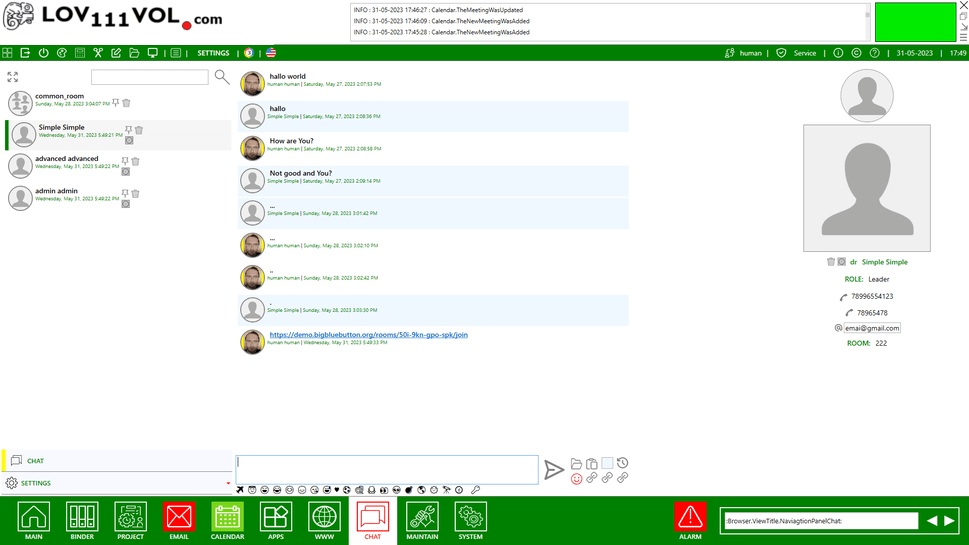
Example screenshot from LAN Messenger showing offline chat window

Secure, fast team communication over LAN

LOV111VOL provides secure messaging over a local network (LAN) or Wi-Fi, which can be useful in places with limited or no internet access. It is suitable for schools, government offices, and remote workstations where quick and private communication is needed.

Even in environments with unreliable connectivity or where cloud services are restricted, LOV111VOL allows teams to stay in touch without relying on the internet.

Frequently Asked Questions – Offline Chat

Q: What is this LAN Chat?
A: A secure, local chat workspace running entirely on your device or local network, without internet dependency—designed for confidential internal conversations and document organization.

Q: How fast is the setup?
A: For a single user, setup takes about 1 minute — download, unzip, and start working. For small teams, if you copy the database to a shared folder, it can take about 1 minute. If you need to adjust database paths to a shared folder, the process may take around 4 minutes.

Q: Do I need internet access?
A: No. Offline Chat works completely offline through your local network or Wi-Fi. It does not require internet access.

Q: What file types can I organize?
A: Documents, emails, tasks, calendars, and project folders — all managed through the Offline Chat workspace.

Q: Is data safe and where is it stored?
A: Yes. All data is stored locally and protected with AES encryption and public/private key pairing. Chat logs can be configured to clear automatically after 7 days. Data is stored locally using SQLite, MSSQL, or MySQL databases, configured easily through a shared folder setup.

Q: Is it compatible with Windows, macOS, or Linux?
A: Yes. It runs natively on Windows. On macOS or Linux, it can be used via Mono or Wine.

Q: Can I customize the application?
A: Yes. You can add your logo and colors for a fully branded experience.

Q: Can I share it with other users?
A: Yes. You can create user accounts, assign permissions, and share access with team members as needed.

Q: Can I use it at work?
A: Yes — but please check with your supervisor or IT manager to confirm portable offline tools are allowed in your organization.

Q: Who is this solution designed for?
A: It’s ideal for professionals needing secure, portable, offline access to documents and chats — including legal teams, healthcare providers, consultants, researchers, and remote workers.

Q: Is there a backup or recovery option?
A: Yes. The workspace supports encrypted backups and can be mirrored to another offline location for recovery.

Q: Is the interface user-friendly?
A: Absolutely. The layout is clean and intuitive, designed to be simple yet powerful based on real user feedback.

Q: Does it work online as well?
A: Offline Chat is primarily designed for offline use on local networks, but it can operate online if hosted on a server. Online functionality depends on your network configuration.

Q: Can it also run from a cloud or network drive?
A: While designed for offline use, it can also be stored on a private cloud or network drive depending on your configuration.

Q: Do I need technical knowledge to run it?
A: No. The main idea of this software is user-friendliness, designed specifically for small teams and companies without an IT department. You can set it up yourself in about 1 minute, without any technical knowledge or support.

Q: Can an admin or service see the communication?
A: No, even an admin or service cannot see it — all communication is encrypted twice.

Download LAN Messenger